-
Type:
Bug
-
Resolution: Duplicate
-
Priority:
 Low
Low
-
None
-
Affects Version/s: 3.15.1
-
Component/s: Customer Portal
-
None
-
2
-
Severity 3 - Minor
Summary
Attachments publicly shared by an Agent with some specific dimensions can't be seen from the customer portal:
- the attachment is not displayed in the comment from the customer portal view
- when trying to open the attachment URL in a new tab, we get the "Forbidden (403)" error
Steps to reproduce
- Create a new issue in a Service Desk project
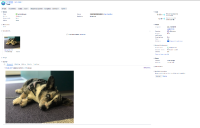
- Open the issue from the Agent View (not the customer portal view)
- Upload an image to the issue and select "Add to issue only"
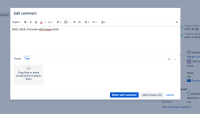
- Add a new comment, include the image in it by specifying the width and height, and click on "Share with customer". For example:
!IMG_4258.JPG|width=826,height=635!
- Open the issue from the customer portal view


Expected behavior
The attachment should be visible in the comment.
Observed behavior
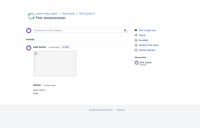
- The comment is visible, but the attachment is not displayed:
- Open the URL of the attachment, and observe the 403 error:



Workaround
Edit the comment from the agent view side and remove the size dimension. For example:
- With thumbnail format:
!IMG_4258.JPG|thumbnail!
- Without thumbnail format:
!IMG_4258.JPG!
The attachment will be visible from the customer portal.e


- duplicates
-
-

- Closed
-
- relates to
-
-
- Closed
-
-
-
- Closed
-
- is related to
-
JSDS-3126 Loading...
- mentioned in
-