-
Type:
Bug
-
Resolution: Timed out
-
Priority:
 Low
Low
-
Component/s: Assets - Jira Field & JQL
-
3
-
Severity 3 - Minor
-
1
Issue Summary
Insight Objects Custom Fields with translated names misbehave with JQL basic search
Steps to Reproduce
- Create an Insight Objects custom field and add a translation to it
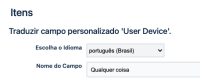
- Switch your profile language to the same language as the translation
- Perform a basic search with that field

Expected Results
The search will be completed and results are shown
Actual Results
An error is thrown "Error CMDB field config not found"
Investigation notes:
- In JQL search, searching for the "cf[id]" works:
- Basic Search will display the translated name, while the URL will display the original name:
- JQL search for the original name and the translated name will fail (with the latter throwing a "field not found" error)


Workaround
Use JQL search with the "cf[customfield_id]" syntax which relies only on the field id and not on its name (translated or not)


