-
Type:
Bug
-
Resolution: Fixed
-
Priority:
 Medium
-
Affects Version/s: 10.82, 10.83, 10.84
-
Component/s: reports - forecast
-
2
-
Severity 2 - Major
-
None
Issue Summary
When attempting to enter estimates on the forecast page, the user is met with an internal server error.
Reproduces on sa1demo.jiraalign.com
Steps to Reproduce
- Navigate to the Forecast Page
- Enter "AI" for the program and "QI-6" for the PI in tier 1.

- Select "Agile by Program" for the View Type
- Type in a number in the Estimate box beside the Epic:
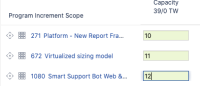
- Press Enter as soon as the number is typed in.


Expected Results
The page forecast page shouldn't throw an internal server error.
Actual Results
Internal Server Error:


Splunk Logs
{ [-]
   ASP_function: Error.asp
   ErrorId: 32
   PageName: Forecast
   correlationid: U43i8c9M0or2QHPFsDmk7Uc/hCB2RZun8Vy0RH7PZtM=
   customer_db: CUSTOMER
   error_aspcode:
   error_aspdescription:
   error_category: Microsoft SQL Server Native Client 11.0
   error_column: -1
   error_description: No value given for one or more required parameters.
   error_file: /OOFunctionsSql.asp
   error_line: 303
   error_number: -2147217904
   error_source:
   log_type: exception
   logfrom_location: Website-ASP
   timestamp: 2020-11-24T14:17:51.025000-05:00
   url: https://instance.jiraalign.com:443/ForecastMainPage.asp
   urlverb: POST
   user: 95
   version: 10.84.0.11849
}
Workaround
Clicking the back button in the browser seems to show the correct data.


- duplicates
-
-
- Closed
-
- links to
- mentioned in
-
Page Loading...
- resolves
-
-