-
Type:
Bug
-
Resolution: Unresolved
-
Priority:
 Low
Low
-
None
-
Affects Version/s: Insight 8.7.11
-
Component/s: Assets - Core experiences
-
2
-
Severity 3 - Minor
Issue Summary
When creating or editing an Insight Object with an attribute TextValue, there is an Insert Code Snippet feature to insert code blocks.
Whichever language we pick up, it, the Language will be display as <not set>
Steps to Reproduce
- Create an Object Type
- Create an object with a TextArea Type Value.
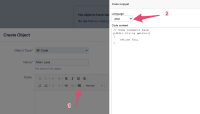
- In the TextArea value, we click on "Insert Code Snippet"
- Set Language to Java, for instance.
- Insert some Java code, Save and Create

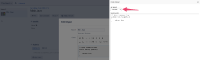
- Edit the object and double click on the code block to edit it.
- Language is set to <not set>

Expected Results
Code snippet windows should retain the Language used. In this example, it should be set to Java.
Actual Results
Language is set to <not set>
Workaround
Currently there is no known workaround for this behavior. A workaround will be added here when available


- links to

- mentioned in
-
Page Loading...