-
Type:
Suggestion
-
Resolution: Unresolved
-
None
-
Component/s: Issue View
-
0
-
7
Problem description
While writing a comment, if you add an attachment, an Add attachments screen will pop up for the upload
Scenario
- As an Agent, start writing a comment to reply to customer.
- Attach a file or image inline. This is possible by drag and drop or click on Attachment > Browse.
- After selecting the file to be attached, a separate screen appears. You must choose either to share it with customer, add it internally or cancel. Example of the screen
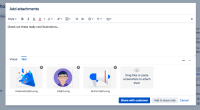
- If you choose to share it, a comment will be added and shared to customer directly with just the uploaded attachment, while your comment is still incomplete.
- If you choose to add it internally, an internal comment will be added and you can continue to write your comment, the attachment is added inline which is expected.
- If you cancel, the attachment is not uploaded and there's no comment added at all.

Suggestion
Disable the Add attachments pop-up if the attachment is uploaded via the Browse button from the Comment tool, so that the attachment(s) can be added inline smoothly without having to dismiss another pop-up box

- links to
