-
Type:
Bug
-
Resolution: Fixed
-
Priority:
 Medium
-
Affects Version/s: 5.11.3, 5.12.1, 5.12.3, 5.12.4, 5.14.0
-
Component/s: Issue View
-
2
-
Severity 2 - Major
-
11
Issue Summary
Inactive Jira users are listed in the reporter field when this field is being edited in Jira Service Management (JSM) issues.
Environment
Replicable on:
- JSM 5.11.3, 5.12.1, 5.12.2, 5.12.3, 5.12.4, 5.14.0
Non replicable on:
- JSM 5.4.18, 5.10.2, 5.11.0
Steps to replicate
- Install JSM on 5.12.2
- Create a new JSM project
- Create a new issue in this JSM project
- Create a new Jira user without a license, and set this user as inactive

- Edit the reporter field
- Start typing the name of the inactive user

Expected behavior
The inactive user should not be listed as a possible user in the reporter field dropdown menu.
Actual result
- The inactive user is listed in the reporter field dropdown menu
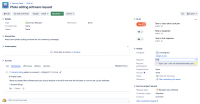
- When selecting this inactive user, the error "The reporter specified is not a user." is shown:
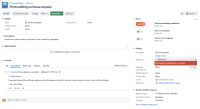


Workaround
- Navigate to <BASE_URL>/secure/admin/SiteDarkFeatures!default.jspa
- Enter com.atlassian.jira.ignoreBrowseUsersPermissionsInUserPickers.disabled in the Enable dark feature section
- Click on Add


- relates to
-
-

- Closed
-