-
Type:
Bug
-
Resolution: Unresolved
-
Priority:
 Low
Low
-
None
-
Affects Version/s: 4.22.6, 5.1.0
-
Component/s: Assets - Jira Field & JQL
-
1
-
Severity 3 - Minor
Issue Summary
This is reproducible on Data Center: Yes
Having more than 25 items/options rendered in an 'Checkbox/Radio' Insight custom field on customer portal does not render the CF as 'Select'.
Steps to Reproduce
- Go to 'Manage apps' > Insight > 'Insight Configuration' page
- Change 'Default number of objects fetched in custom fields' (under 'User Interaction' section) to a number greater than 25 (e.g. to 50)
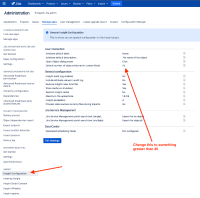
- Create an Insight custom field and set its 'Type of interaction' to 'Checkbox/radio'
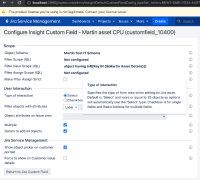
- Configure the custom field to be rendered as a field for a request type in customer portal
- Create more than 25 objects/assets that'll be rendered for the Insight custom field
- Go to the 'Create request' page of that request type on customer portal


Expected Results
The custom field should be rendered as 'Select'.
Actual Results
The custom field is still rendered as 'Checkbox/radio'
Workaround
Currently there is no known workaround for this behavior. A workaround will be added here when available


- links to
