-
Type:
Bug
-
Resolution: Fixed
-
Priority:
 Low
Low
-
Component/s: Knowledge Base & Confluence integration
-
None
-
4
-
Severity 3 - Minor
Summary
If a Confluence space is linked as knowledge base to JIRA Service Desk, when the agents open a ticket in JSD queue, the KB articles under "Related knowledge base articles" section are locked out and the gents are not able to share it as a comment.
Customer Impact
Agents are not able to share the KB articles as a comment.
Steps to Reproduce
- Go to a Cloud instance with multiple products (e.g., Jira Software, Confluence and Jira Service Desk)
- Add a user with only site access, do not assign any product licenses. So, this user is treated as a customer in JSD projects.
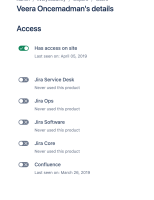
- Go to a JSD project which is linked to a Confluence space as the KB, and add the user account created in Step 2 as the customer.
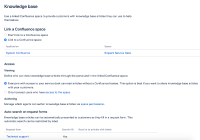
- Go to JSD project settings, make sure that KB viewing access is set to 'Everyone with access to your service desk can read articles without a Confluence license. This option is best if you want to share knowledge base articles with your customers'.
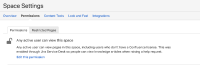
- If everything is setup properly, you'll notice 'Any active user can view this space' in the KB space permissions in Confluence.
- Login to the portal as the customer and create a support case.


Expected Results
Agents should be able to share Related knowledge base articles as a comment in the ticket.
Actual Results
"Related knowledge base articles" are locked out and the gents are not able to share as a comment.
This article is restricted. Only people with permission can view it.

Additional info
It is working fine when the ticket was raised by (i.e., reporter) a portal only customer who is not migrated to Atlassian account.
Workaround
No workaround at the moment.


- is duplicated by
-
-
- Closed
-
- mentioned in
-
Page Loading...
- relates to
-