-
Type:
Bug
-
Resolution: Unresolved
-
Priority:
 Medium
-
None
-
Affects Version/s: 7.13.6, 7.13.9, 8.2.3, 8.3.2, 8.3.3, 8.3.4, 8.4.2, 8.5.0, 8.6.0, 8.13.1, 8.14.1
-
Component/s: Administration - Others
-
7.13
-
24
-
Severity 2 - Major
-
2
Issue Summary
Trying to clear the Default resolution results in an XSRF security token missing page
Steps to Reproduce
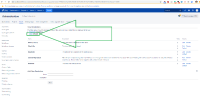
- Go to Jira Administration > Issues > Resolutions
- Click the Clear default resolutions link:

Expected Results
The default resolution is cleared.
Actual Results
An XSRF missing token screen is shown:

Workaround
- Credit to e6a44563da75
A possible workaround is to create a new throw-away resolution. Make the new resolution the default and then delete the new resolution
- Delete the default resolution from database:
DELETE FROM
	jiraschema.propertyentry
WHERE
	ENTITY_NAME='jira.properties' AND
	PROPERTY_KEY='jira.constant.default.resolution'


- relates to
-
-

- Closed
-
- mentioned in
-
Page Loading...