-
Type:
Bug
-
Resolution: Fixed
-
Priority:
 Medium
-
Affects Version/s: 11.1.1
-
Component/s: Azure DevOps Connector
-
2
-
Severity 3 - Minor
-
No
Issue Summary
After adding a Story type mapping to a new ADO connector (created with Jira Align: 11.1.1.45741), the error message below is thrown each time the connector settings are saved.
Steps to Reproduce
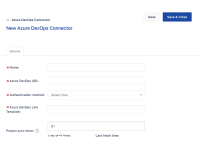
- Create a new Azure DevOps Connector by clicking on the 'Add connector' button
- Fill in the Required Field Name
- Azure DevOps URL
- Authentication method
- Azure DevOps Link Template
- Save
- Fill in the required field in the 'Projects' tab
- Go to the 'Items' tab
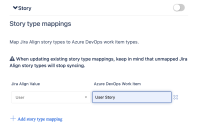
- Expand the 'Story; section
- Add a Story type mapping entry
for example:
- Save


Expected Results
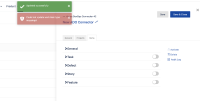
The changes are saved and only the message 'Updated successfully' appears
Actual Results
- The error message 'Could not update work item type mappings!' appears but a second later the message 'Updated successfully'
appears and the changes are saved.
- Looking in the Web browser developer tools network tab we can see a 500 - Internal Error status with the POST call to
https://<siteInstanceName>.jiraalign.com/api/tfs/<connectorId>/workItemTypeMapping
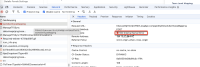
Also, in the console log, we see the message:Failed to load resource: the server responded with a status of 500 ()


Workaround
Currently, there is no known workaround for this behavior apart from ignoring the message. A workaround will be added here when available


- is connected to
-
JAIAC-5822 Loading...
- resolves
-
-