-
Type:
Bug
-
Resolution: Fixed
-
Priority:
 High
High
-
Affects Version/s: 10.128.3
-
Component/s: Product - Login
-
2
-
Severity 2 - Major
-
No
-
None
Issue Summary
Users are automatically logged back in Jira Align even after session expires.
Steps to Reproduce
- Login to Jira Align
- Make sure Enable SSO is set to YES in Platform > Platform Settings > Security
- Leave Sign Out URL blank.
- Leave your screen open and wait for timeout
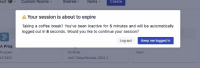

Expected Results
The user will be logged out from Jira Align.
Actual Results
The user is logged back in automatically
Workaround
- In your browser's developer tools, clear your local storage.
Chrome: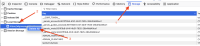
Firefox:
- If you're using SSO, make sure that a signout URL is set.


- Testing discovered
-
-

- Short Term Backlog
-
- is action for
-
SAM-86 Loading...
- is related to
-
- is resolved by
-
(1 mentioned in)