-
Type:
Bug
-
Resolution: Fixed
-
Priority:
 High
High
-
Affects Version/s: 10.118.3
-
Component/s: Dynamic Reports - Backlog
-
2
-
Severity 2 - Major
-
No
Issue Summary
When trying to sort the Portfolio Epic backlog by Score, the sorting is not happening.
This is reproducible on Data Center: Reproducible in Cloud
Steps to Reproduce
- Open Backlog
- Select the view "Portfolio Epic Backlog"
- Select a Programa and PI
- Add the column 'Score'
See the picture
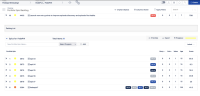
- If you click in the column 'story', it appears the message 'Do you want to apply this rank', see the image

- If you click in the column 'Score', it does not appear the message 'Do you want to apply this rank' and this is your concern, correct?

Expected Results
See appear the message 'Do you want to apply this rank', see the image

Actual Results
The message 'Do you want to apply this rank' does not appear after clicking in the "Score", see the image column
Workaround
N/A
Note
After clicking on the score column you may observe the Portfolio Backlog info disappearing. The workaround for this issue is to remove the score column.


- is connected to
-
JAWM-4756 Loading...
- resolves
-
-
(1 mentioned in, 2 resolves)