-
Type:
Bug
-
Resolution: Fixed
-
Priority:
 Medium
-
Affects Version/s: 10.75, 10.76
-
Component/s: Portfolio - Themes
-
None
-
1
-
Severity 3 - Minor
-
A-Team - TART5
-
None
Issue Summary
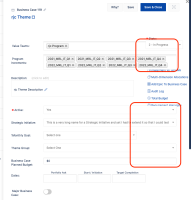
Theme slide-out panel : Long Strategic Initiative names cause some fields to overlap
Steps to Reproduce
- Create a very long Strategic Initiative name
- Browse to Admin >> Platform >> Dropdowns
- Select Strategic Initiative
- Add the following content to an entry:
This is a very long name for a Strategic Initiative and yet I had to extend it so that I could test - Save
- Browse to Theme grid
- Open any theme (slide-out is displayed)
- In the Strategic Initiative dropdown, select the long name option
- Notice several fields are resized, overlapping the links menu underneath Theme's Status dropdown
Expected Results
- The fields can be resized but should keep visual accuracy and don't overlap with other elements.
Actual Results
- The following dropdown fields are resized when long names are selected:
- Programs
- Releases
- Active
- Strategic Initiative
- Theme Group
- The following text field is resized when long names are selected:
- Theme Planned Budget
- Theme Planned Budget

Workaround
- Using shorter names for Strategic Initiatives will prevent that this unwanted behavior from manifesting.

- is duplicated by
-
-
- Closed
-
- resolves
-
ALIGNSP-5388 Loading...