 Low
Low Summary
The Show Quick Filter names CheckBox is not Working - Agile Wallboard Gadget.
Steps to Reproduce
- Add the Agile wall Board Gadget on a Dashboard
- Choose a Board and save
- Now if we check the Show quick filter box.
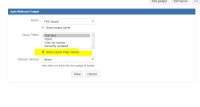

Expected Result
The quick filter name should show up on the wallboard gadget.

 Above screenshot taken from JIRA 7.6.3
Actual Result
Empty bracket are shown in the gadget.

Workaround
No workaround at the moment


- relates to
-
JRASERVER-71678 Trying Quick Filters on Agile Wallboard Gadget doesn't present any new data.
-

- Closed
-
- mentioned in
-
Page Loading...