-
Type:
Bug
-
Resolution: Fixed
-
Priority:
 Highest
-
Component/s: None
Summary
The Epic Link field is not populated when 'Create issue in epic' from issue preview screen in the JIRA project view.
This prevents tickets from being created as the 'Epic Link' field is required but cannot be entered manually.
Environment
- JIRA Software Cloud
- 7.2.0-OD-04-029
Steps to Reproduce
- Navigate to the 'Issues' view for a software project with an Epic
- Select the 'Epic' from the issues list so that the issues is previewed to the right of the screen
- Click on the '+' to open the Create issue in epic : pop up dialog
- Fill in the required fields and click 'Create'

Expected Results
- The 'Epic Link' field is populated; and
- The issue is created
Actual Results
The error Epic with key '' does not exist appears and the issue cannot be created.

Workaround
This does not occur when the 'create issue in epic' happens when the issue is opened outside the preview screen, so there are a few options:
- Search for the Epic issue (ICT-438 in the screenshot) to open the browse issue screen and create the 'issue in epic' from there.

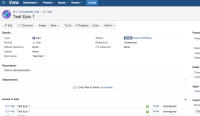
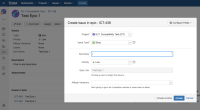
- Click on the Issue Link on the Preview window to open the issue and create the 'issue in epic' from there.

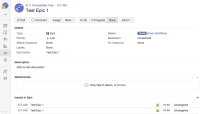


- duplicates
-
-

- Closed
-
- was cloned as
-
NEXT-691 Loading...