-
Type:
Bug
-
Resolution: Fixed
-
Priority:
 Low
Low
-
Affects Version/s: 4.3.1, 4.5.9, 4.16
-
Component/s: Customer Portal
-
None
-
1
-
Severity 3 - Minor
Issue Summary
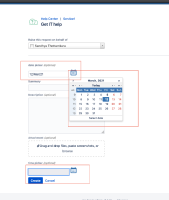
In the customer portal, if you have multiple date picker fields, clicking an enter on the second date picker opens the calendar for the first date picker.
Steps to Reproduce
- Configure 2 date/time picker fields in the service desk customer portal
- Click on 'enter' from the second date picker field, the first date picker calendar gets opened.

Expected Results
The calendar for second date picker should be opened
Actual Results
The calendar for first field is getting opened.
Workaround
The calendars shows up correctly when clicked on the calendar icon, this happens only when the user clicks 'enter'
