-
Type:
Bug
-
Resolution: Fixed
-
Priority:
 Low
Low
-
Affects Version/s: 4.9.0
-
Component/s: Customer Portal
-
None
-
3
-
Severity 3 - Minor
-
4
Issue Summary
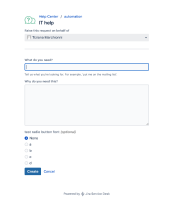
The radio button field name in the customer portal has a different font size than other kind of fields. Other fields are set on 12px font size while radio button font size is 14px.
Steps to Reproduce
- add a radio button custom field
- add the radio button field to the field visible in the create issue form for a given request type on the customer portal
- open the customer portal and raise a request for the above request type
- observe that the font size for the radio button custom field name is bigger than the other fields name. In fact is 14px while the other ones are 12px:
Expected Results
the font size should be equal for all fields name in customer portal
Actual Results
font size is bigger for radio button field name
Workaround
Currently there is no known workaround for this behavior. A workaround will be added here when available

