-
Type:
Bug
-
Resolution: Unresolved
-
Priority:
 Low
Low
-
None
-
Affects Version/s: 4.1.0, 4.3.2
-
Component/s: Automation
-
7
-
Severity 3 - Minor
-
1
Issue Summary
When using the automation rule "Approval required", duplicate customer notifications will be sent to inform the customer that the status has changed, if the status changed is caused by the automation.
Steps to reproduce
- Create a new Service Desk project
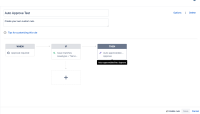
- Create an Automation rule with:
- WHEN: "Approval Required"
- IF: issue matches "issuetype = "Service Request with Approvals""
- THEN: Auto-approve/Decline -> Approve
- See the screenshot below for reference:
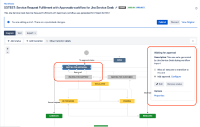
- Create a new workflow (or edit an existing workflow "Service Request Fulfilment with Approvals workflow for Jira Service Desk") associated to the issue type "Service Request with Approvals", with the following configuration:
- Add a status OPEN directly connected to the Issue creation transition.
- Do not configure status OPEN with an Approval
- Add a transition from the status OPEN to the status "WAITING FOR APPROVAL".
- Configure the transition "WAITING FOR APPROVAL" with an Approval
- See the screenshot below for reference:
- Create a new ticket with the issue type set to "Service Request with Approvals" and make sure that the approver field is already set
- Notice that the status of the ticket is OPEN, which is expected
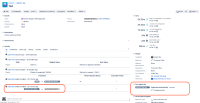
- Click on the transition from OPEN to "WAITING FOR APPROVAL"
- Notice that the issue was automatically approved, and transitioned to the status "WAITING FOR SUPPORT":
- Check the customer notification sent to the reporter


Expected results
The notification should only show 1 status change from "WAITING FOR APPROVAL" to "WAITING FOR SUPPORT"
Actual results
The notification shows 2 times the status change from "WAITING FOR APPROVAL" to "WAITING FOR SUPPORT".

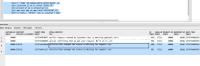
We can also see from the AO_4E8AE6_NOTIF_BATCH_QUEUE that 2 notifications were created about the same status change, as if 2 events had been triggered for this status change:
- Query:
SELECT * FROM "AO_4E8AE6_NOTIF_BATCH_QUEUE" sd
join jiraissue ji on ji.id=sd."ISSUE_ID"
join project pr on ji.project=pr.id
join app_user app on app.id=sd."RECIPIENT_ID"
where pr.pkey = 'SDTEST' and ji.issuenum = 186;
- Result:

Workaround
No workaround known so far


- links to

- relates to
-
ACE-2975 Loading...