-
Type:
Bug
-
Resolution: Fixed
-
Priority:
 Medium
-
Affects Version/s: 10.3.11
-
Component/s: Assets - Import, Assets Integration
-
1
-
Severity 2 - Major
Issue Summary
Assets - AWS Integration app version 3.1.1 fails to import Operating System object type details with below error:
 Error getting platform type.
java.lang.IllegalArgumentException: No enum constant software.amazon.awssdk.services.ssm.model.PlatformType.Linux
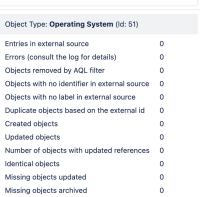
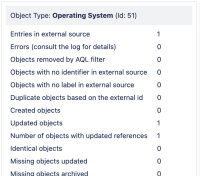
On the GUI, we don’t see any errors, but it is observed that the app fails to identify any entries in the external source for the operating system object type.
- Import run result with app version 3.1.1

- Import run result for app version 2.x for the same import configuration.

Affected Version
This affects the Asset AWS-integration app version 3.1.x (The option is not available in the dropdown)
Steps to Reproduce
- Configure an AWS object import in Jira using Assets - AWS Integration 3.1.1
- Use the predefined structure and predefined configuration for configuring the import.
- Make sure that you have a Linux-type EC2 instance running in AWS.
- Run the import in Jira.
Expected Results
The operating system associated with the EC2 instance will get imported under the “Operating System“ object type in Jira.
Actual Results
The operating system associated with the EC2 instance is not imported.
Workaround
Downgrading the Assets - AWS Integration plugin to version 2.2.20 helps to mitigate the issue.
Review the plugin compatibility matrix prior to downgrading the plugin.
- links to


