-
Type:
Bug
-
Resolution: Fixed
-
Priority:
 Low
Low
-
Affects Version/s: 10.7.3
-
Component/s: Assets - Core experiences
-
1
-
Severity 3 - Minor
-
4
Issue Summary
When a user tries to select an asset object from the asset type custom field on the customer portal, all the available asset objects are not displayed when the user clicks on the magnifying glass "Browse" option.

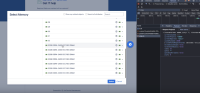
The pop-up window supports lazy loading, and we fetch new objects in batches of 25; hence, once the user scrolls down to the bottom of the list, the next 25 objects should be fetched and displayed. However, with we are observing issues with loading new objects:
Jira version 10.3.x:
- The pop-up screen features two scroll bars. Initially, only 50 objects are loaded when the user scrolls down to the bottom of the list by scrolling the inner scroll bar. Once at the bottom, the user should scroll up and then back down again to fetch the next 25 records.
After scrolling down first time only 50 objects are fetched

After scrolling down multiple times remaining objects are fetched

Jira version 10.7.3
- The inner scroll bar has been removed, so the lazy loading does not work, and only 25 records are displayed on the browse object screen. User does not have any option to fetch more objects.

Steps to Reproduce
- Create more than 50 objects for any object type.
- Create an Asset object type custom field for the object type and add the field on the service portal.
- Navigate to the service portal and click on the "browse" button for the Asset object type custom field.
- Scroll to the bottom of the list and observe that not all the objects are loaded.
 You can monitor the network logs in dev tools to see how many times the object fetch call is triggered.
Expected Results
All the objects should keep on loading as the user scrolls down the list.
Actual Results
Not all the objects are fetched when the user scrolls down to the bottom of the screen.
Workaround
For version 10.3.X : User can try to scroll up and down multiple time to fetch next 25 objects. However the same workaround does not apply to Jira version 10.7.


- links to
