Issue Summary
Asset cannot be modified in Object View if mandatory boolean attribute is involved.
This happens only if a new boolean attribute has been created with cardinality set to 1 (which means a value will be always created, either with FALSE or TRUE). Then, a previously created object cannot be modified from the objects view.
Steps to Reproduce
- Create an object type that contains a text or a status type attribute.
at least one Boolean attribute. The Boolean attribute has a cardinality of at least 1 configured. - Create a new object, fill out the text or status field.
- Create a new object type attribute, type Boolean. Set cardinality to 1.
- Modify the original object within the object view (e.g. from object URL <baseURL>/secure/insight/assets/IT-1).
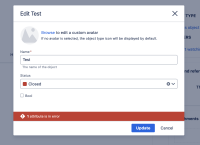
- The object cannot be modified:

Expected Results
The object can be modified.
Actual Results
The object cannot be modified as "1 attribute is in error" message appears.
Workaround
The only workaround is to check the boolean attribute (for value TRUE) and uncheck it (for value FALSE) - cumbersome if many attributes need to be filled out.
Versions Tested
Please confirm all versions that have been tested for this issue, and indicate whether the tested version is affected or not affected, below:
| Testing Requirements | Version | Affected Version |
|---|---|---|
| Customers Reported Version | 10.3.7 | Yes |
| Most Recent Bug-Fix Release | ||
| Previous Major Release | ||
| Most Recent LTS | 10.3 | 10.3 |
| Previous Supported LTS | 5.12 | 5.12 |

- is cloned from
-
JSDSERVER-16344 Asset cannot be created in Object View if mandatory boolean attribute is involved
-

- Closed
-
- links to
