-
Type:
Bug
-
Resolution: Fixed
-
Priority:
 Low
Low
-
Affects Version/s: 10.3.8
-
Component/s: Assets - Object, Type and Schema
-
1
-
Severity 3 - Minor
Issue Summary
In the Object Schema view page, under the Related Jira issues section, if the object is linked with a more than 10 issues, we see the following footer text and a JQL link to find the related issues:
This object has more related issues. View all issues
This View all issues URL is built with the following href:
href="{RLABS.Ajax.CONTEXT_PATH}/issues/?jql={$allIssuesQuery}"
When the object in context has a special character (viz., "&") in its name/label this $allIssuesQuery breaks because the URL is not encoded.
Steps to Reproduce
- Name an Object with special character viz., ABC & something
- Add this Object to more than 10 issues in some Assets custom field
- Open the Object schema view for the object and click on the View all issues on the right bottom corner

Expected Results
The JQL search in a new tab handles the special character and produced a valid JQL search + result:
Correctly encoded URL:
https://<BASE-URL>/issues/?jql=(%20Resolution%20IS%20EMPTY%20)%20AND%20(%20cf%5B10304%5D%20IN%20(%22ABC%20%26%20something%20(SAMITSM-55)%22))

Actual Results
The Search breaks since the URL breaks to encode the special character:
https://<BASE-URL>/issues/?jql=(%20Resolution%20IS%20EMPTY%20)%20AND%20(%20cf%5B10304%5D%20IN%20(%22ABC%20

Workaround
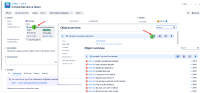
- From the Jira Issue view -> click on the name/label of an object in a custom field (1) -> Click on the Jira logo to see all related issues (2) -> Look at the list of issues related to that object:
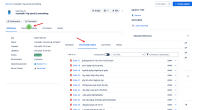
- From the Object View page (/secure/insight/assets/EXAMPLE-1234) click on the Connected Tickets (1) -> Look at the Connected Tickets tab:


Versions Tested
| Testing Requirements | Version | Affected Version |
|---|---|---|
| Customers Reported Version | 10.3.8 | Yes |
| Most Recent Bug-Fix Release | ||
| Previous Major Release | ||
| Most Recent LTS | 10.3.8 | yes |
| Previous Supported LTS |


- links to
