-
Type:
Suggestion
-
Resolution: Unresolved
-
None
-
Component/s: Request Type Configuration
-
1
-
3
Issue
When editing the the Description (optional) field of any Request Type in the page Project Settings > Request Types, it is not clear that the description supports Wiki markup, since there is no button/option to add any formatting such as hyperlinks, italic/bold characters, etc...
However, the description does support Wiki Markup, since:
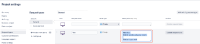
- If we use the Wiki Markup syntax in the description as shown below:
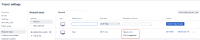
- After we save the change, the formatting is properly rendered:
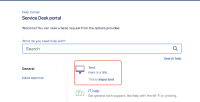
- When visiting the customer portal, we can also see that the formatting is rendered:


Suggestion
Improve how the description field is showing to users while it is being edited, by showing the icons we see when editing Jira issue text fields/comments, in order to:
- make it clear that wiki markup is supported
- make it easy for users to add formatting
Basically, the suggestion is to make this field look the same as the Jira issue description field:

Note
The same applies to some other text fields that can be configured to customize the Customer Portal. For example, the portal "Introduction Text" can also be configured with Wiki Markup:

- links to


