Issue
In JSM 4.18.0, 2 main changes were made to SLAs
- SLAs were added to the customer portal
- the look and feel of SLA on the agent view was modified
The problem is that there is not a lot of information about how the look and feel of SLA changed on the agent view in the documentation How teams see SLAs, especially around past SLA cycles:
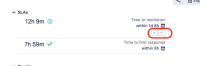
- In older JSM version (up to 4.17.x), past cycles show as "check boxes" that can either include a green tick if the SLA did not breach during the cycle, or a red cross if the SLA had breached
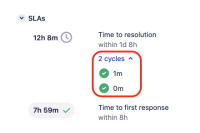
- In any JSM version from 4.18.0, the past SLA cycles are listed in an "expand" panel underneath the SLA, as shown, and the time shown in these cycles is the elapsed time:


Suggestion
The documentation has a few sections like Ongoing SLAs, Completed SLAs that describe how ongoing and complete SLAs look like.
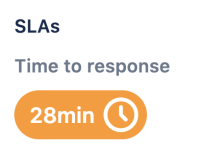
The suggestion is to add a new section underneath called Past SLA cycles, describing what the past cycles look like on the agent view, and also explaining that past cycles are not showing on the customer view.
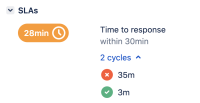
Screenshots showing what SLAs with past cycles look like:
- on the agent view
- on the customer view


- Mentioned in
- mentioned in
-
Page Loading...