-
Type:
Bug
-
Resolution: Fixed
-
Priority:
 Low
Low
-
Affects Version/s: 4.22.1, Insight 8.9.1
-
Component/s: Assets - Import
-
5
-
Severity 3 - Minor
-
11
Issue Summary
This is reproducible on Data Center: yes
Under certain conditions, the secret key for Insight Integration imports is automatically removed each time you update the configuration. The issue has only presented in Jira 8.22, testing in 8.18 and 8.20 did not reproduce it. The issue has been tested and confirmed with the Azure and AWS integration addons. It's possible others are affected as well.
The secret key has been confirmed to disappear with the Azure Integration addon when setting the configuration to "Azure China" or "Azure Germany". Azure (default) and Azure US Government are not affected.
The secret key has also been confirmed to disappear with the AWS Integration addon when setting the region to EU (Stockholm) [eu-north-1], EU (Paris) [eu-west-3], EU (London) [eu-west-2], EU (Milan) [eu-south-1], Asia Pacific (Hong Kong) [ap-east-1], etc. Examples where secret key remains in place are: EU (Ireland) [eu-west-1] and EU (Frankfurt) [eu-central-1]
Steps to Reproduce
- Install Insight Azure Integration addon for Insight in Jira 8.22 (8.18 and 8.20 were not affected when testing)
- Go to object schema > configure > import
- Create new configuration > Azure Import > fill out configuration details
- Configuration should be "Azure China" or "Azure Germany"
- Select cog for created configuration > configure
- Select next to get to module fields
- Secret key will be missing
Expected Results
- secret key should be retained with checkbox for "Change value" needing to be selected in order to update or clear out the existing value
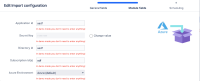

Actual Results
- secret key will be missing and require that it be re-entered
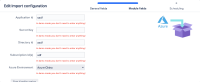

Workaround
It is necessary to re-enter the secret key every time the configuration is updated

