-
Type:
Bug
-
Resolution: Timed out
-
Priority:
 Low
Low
-
Component/s: Issue View, Request Type Configuration
-
2
-
Severity 3 - Minor
Summary
When moving one issue from one service project to another, the "Request Type" value stays the same – though in reality, the request type should show as 'None'
Steps to Reproduce
- Create a Service Desk ticket with a request type value
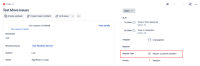

- Move the issue from one service project to a different service project
Expected Results
The request type value is empty.
Actual Results
The request type value has the same value as the previous issue type which is incorrect. If you change to "Old Issue View", it will show "No Match" for the request type, which is the expected outcome.

The customer portal view will show a blank request type.

Workaround:
Set the request type on the issue again once the issue is moved.


- relates to
-
ARMOR-2050 Loading...