-
Type:
Bug
-
Resolution: Fixed
-
Priority:
 Low
Low
-
Component/s: SLA
-
None
-
5
-
Severity 3 - Minor
Summary
Sometimes, SLA does not stop when an agent is assigned to the ticket by automation rules triggered upon ticket creation
Steps to Reproduce
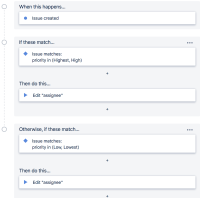
- Create an automation rule to assign issues as soon as the issue is created
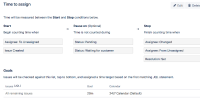
- Create an SLA Time to assign that starts when an issue is unassigned and which stops when the issue has the assignee field set to a user:


Expected Results
When the issue is created and assigned to a user from the automation rule, the SLA Time to assign is met
Actual Results
When the issue is created and assigned to a user from the automation rule, the SLA Time to assign is met and you can see the same information in the SLA audit log, however, the same information is not reflected in the ticket. The SLA clock keeps running and eventually breaches.
If you apply the kb Missing or corrupted SLA data in Jira Service Desk the issue starts showing the correct SLA information.
Workaround
- Apply the kb Missing or corrupted SLA data in Jira Service Desk the issue starts showing the correct SLA information
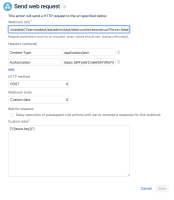
- We have another workaround using a free add-on Project Automation for JIRA Cloud - lite available in the marketplace that can help us to get around this by setting it up like this: