-
Type:
Bug
-
Resolution: Timed out
-
Priority:
 Low
Low
-
Component/s: Customer Portal - Help Center
-
2
-
Severity 3 - Minor
Summary
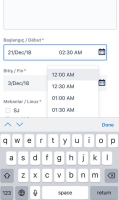
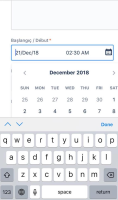
When trying to edit a time/date picker field on the portal via a mobile web browser, the keyboard on iOS cannot be minimized so that the entire calendar/time picker is visible. The page scroll is locked - so it's not possible to scroll up/down to reveal the hidden portion(s) of the calendar/time picker. Android users are able to minimize the keyboard and choose the desired date/time.
Environment
- Jira
- iOS
Steps to Reproduce
- Navigate to the portal
- Try to edit a date/time picker field
Expected Results
- A calendar/time picker appears in full and the user is able to choose a time/date by tapping on a time/date option
Actual Results
- The keyboard covers the calendar/time picker
- User is unable to minimize the keyboard so that the entire calendar/time picker is visible


Notes
- Issue occurs when using the "new help center"
- Able to replicate issue on multiple iOS devices
- Confirmed that the issue occurs on iOS 11.4.1
- Issue occurs in Chrome and Safari
- Time picker is not scrollable on either Android or iOS
- Unable to scroll up/down to reveal the hidden portion of the calendar/time picker
Workaround
- Turn off the new help center: Navigate to Project Settings > Portal Settings > View and customize; under Try the new help center, put the toggle switch into the "off" position. Please quote this bug ticket number in the feedback form.



- is cloned from
-
-
- Closed
-