-
Type:
Suggestion
-
Resolution: Won't Fix
-
Component/s: SLA
-
1
NOTE: This suggestion is for JIRA Service Desk Cloud. Using JIRA Service Desk Server? See the corresponding suggestion.
Scenario
Take Time to Resolution for example, which is an SLA that can be reset:
- Configure a goal that will breach in 1 minute
- Create an issue that follows the goal, wait more than 1 minute, then resolve it for the SLA to breach
- Reopen the issue for the SLA to be reset
- Resolve it within 1 minute for the SLA to be achieved
- Reopen it again and resolve it for the SLA to be achieved again
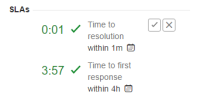
From the SLA panel:
- The previous statuses of the SLA are recorded, one Breached and one Achieved
- The current SLA status is Achieved

Suggestion
Since the SLA has breached once, the Breached status should be displayed/highlighted instead of the current status.

- is related to
-
- Closed
-
- Closed