-
Type:
Bug
-
Resolution: Fixed
-
Priority:
 Highest
-
Component/s: Assets - AQL
-
6
-
Severity 3 - Minor
-
16
-
Warranty
Issue Summary
Steps to Reproduce
- Create an Asset object type with multiple attributes. In my case, it was more than 10 attributes.
- Use Basic Search and go to an Attribute listed. Multiple objects would be listed, if the objects have this attribute value set.
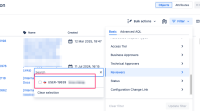
- Now use the search functionality to search the entries that are shortlisted.
- No objects are shortlisted
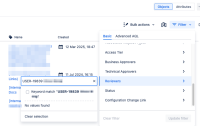


Expected Results
The search should actually search the objects displayed before typing the search keywords. i.e. search should display objects with Name/Labels matching the search keyword.
Actual Results
- No objects are shortlisted
Notes
This is not related to JSDCLOUD-16068 as the issue occurs on attributes within 10 attribute limit.
Workaround
Use Advanced AQL search which works as expected.

