-
Type:
Bug
-
Resolution: Duplicate
-
Priority:
 Medium
-
Component/s: Operations - Users & Roles
-
None
-
Severity 3 - Minor
Issue Summary
- If a non product-admin*user is promoted to Operations Global Admin, they do not have access to the various Operations settings under *Jira Settings -> Products -> Operations
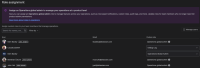
- In the Old Navigation, When clicking on Jira settings -> Products, they are brought to the Role Assignment page but have no way to easily navigate to the global Integrations, Syncs, On-call, etc. pages without having to directly type in the URLs of the respective pages.
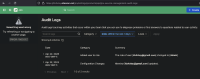
- In the New Navigation, these users are unable to access any settings when clicking on Operations -> General settings.
- The only way for these users to see the options under Jira settings -> Products is to promote them to a product-admin, which seems to defeat the purpose of the Operations Global Admin role.
Steps to Reproduce
- As an admin, navigate to "Role Assignment" at https://site-name.atlassian.net/jira/settings/products/ops/role-assignment
- Promote a user with JSM Agent Access from User to Operations Global Admin.
- Have the newly promoted user log in to JSM and navigate to Jira Settings -> Products (old view) OR select Operations -> ... -> General configuration from the left navigation panel (new view)
Expected Results
At the very least, the non product-admin Operations Global Admin should be able to see and select the various Operations settings under Jira Settings -> Products -> Operations (old view) OR Operations -> General Settings (new view) like so:


Actual Results
Operations Global Admins that are not product-admins are either:
- "Confined" to the Role Assignment page under Jira Settings -> Products in the Old View, with no other settings to choose from. They can access the other settings by typing the page's url directly into the browser, e.g. https://site-name.atlassian.net/jira/settings/products/ops/integrations
- Met with an error message in the New View and are brought to the Audit Log page. Similar to the old view, these users can access the other settings by typing the URLs of the respective pages into the browser


Workaround
- The Global Admin can access the different settings by entering the page's URL directly into the browser, for example
- Optionally, the user can be promoted to a product-admin at https://admin.atlassian.com, but this seems to defeat the purpose of having the Operations Global Admin role.


