-
Type:
Bug
-
Resolution: Unresolved
-
Priority:
 Low
Low
-
Component/s: Calendar
-
None
-
1
-
Severity 3 - Minor
Issue Summary
For JSM project's Views option, there is a Date fields option when a user tries to configure the views. If a custom Date Picker field is selected in the Start date or End date field and when that custom field is moved to Trash or permanently deleted from the instance, the following error is observed on the UI:
Something went wrong on our end
If this keeps happening, share this information with your admin, who should contact support.
Hash 1BXOBWX
Screenshot of the error:

Steps to Reproduce
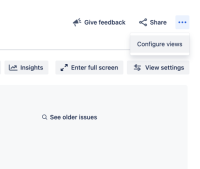
- For any JSM project, go to Views and select the three horizontal dots on the top right corner of the screen:
- Select Configure views option and go to Date fields.
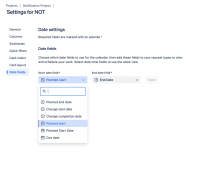
- Change Start date field or End date field to any custom Date Picker field and click Save:
- Now, delete any of the selected custom field permanently.


Expected Results
On the UI, the option to select another field should be available
Actual Results
The following error is seen.
Workaround
Restore the deleted field to resolve the issue.
If the field is permanently deleted, the workaround does not work.


- is resolved by
-
CORCAP-2199 Loading...