-
Type:
Bug
-
Resolution: Timed out
-
Priority:
 Low
Low
-
Component/s: Request type - Single request type configuration
-
1
-
Minor
Issue Summary
Customer field user filtering doesn't work with Roles.
Steps to Reproduce
- Give a user permission to be a part of a specific group. for example customer group in JSM.
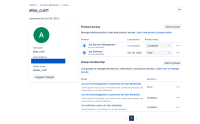
- The user is a member of jira-servicemanagement-customers-atl-test-abhalotia
- Add this group to a project role TEST.

- create a custom field called CF_user_TEST (user picker)
- Enable user filtering
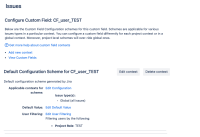
- Add this Custom Field in a Request Type, and check use present value and hide from portal as shown in the screenshot. And then save. the changes.
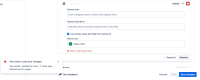
- An error will come up
We couldn’t save your changes
We couldn’t update the “test -1” issue type. Refresh and try again.


Expected Results
No error is expected.
Actual Results
We couldn’t save your changes
We couldn’t update the “test -1” issue type. Refresh and try again.
Workaround
A workaround is if we replace User Filtering with groups, for example Group: jira-servicemanagement-customers-atl-test-abhalotia


