-
Type:
Bug
-
Resolution: Fixed
-
Priority:
 Low
Low
-
Component/s: Request type - Single request type configuration
-
None
-
2
-
Minor
Issue Summary
Unable to change "Default Assignee" in the Assignee hidden field in the Request form, it throws an error "Enter a valid preset value".
Steps to Reproduce
- Add the "Assignee" field to the Request form and configure the "Default assignee" user value.
- Now, for the configured user in the Default Assignee, remove the "Agent JSM Product" access.
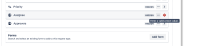
- Got to the Request form and got an error in front of the Assignee field "Enter a valid preset value".

Expected Results
Able to expand the "Assignee" field and update the "default assignee" value.
Actual Results
The below error is thrown on the Request form:
Enter a valid preset value
Along, with the project settings error:
"This service project has configuration problems and may not work as expected."
Workaround
- If aware of the default assignee, provide JSM - Agent product access and change the default assignee afterward.
- Remove the Assignee field from the Request form, add it back, and configure the required default assignee.

- is cloned as
-
MC-975 Loading...