-
Type:
Bug
-
Resolution: Unresolved
-
Priority:
 Low
Low
-
None
-
Affects Version/s: 10.3.9, 11.3.1
-
Component/s: Administration - Workflows
-
None
-
10.03
-
1
-
Severity 3 - Minor
Issue Summary
Workflow with special characters in name redirects to a dead link page for unassigned issue type from the workflow scheme page.
Steps to Reproduce
- Configure a workflow with special character in name. For e.g. Synchronoss R&D workflow
- Map the workflow to Unassigned issue type from the Workflow scheme
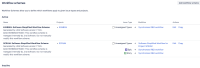
- Navigate to workflow scheme page and open the workflow associated with Unassigned Issue Types.
- Behaviour is same for any other project level permissions
Expected Results
The workflow opens correctly

Actual Results
Workflow fails to load with Oops, you've found a dead link error. Same workflow assigned to specific issue types works correctly.

Workaround
Currently there is no known workaround for this behavior. A workaround will be added here when available.
Use workflow names without special characters.
Note:- The issue is due to erroneous url encoding. Workflow name Synchronoss R&D workflow is wrongly url encoded to Synchronoss+R%26amp%3BD+workflow due to special character. The correct encoding should be Synchronoss%20R%26D%20workflow.

