-
Type:
Bug
-
Resolution: Fixed
-
Priority:
 Low
Low
-
Affects Version/s: 7.3.6
-
Component/s: Issue - Attachments, Rich Text Editor
-
None
-
7.03
-
1
-
Severity 3 - Minor
Summary
Pasting a screenshot or dragging an image into the comment field on the Assign Issue dialog does not render the image.
Steps to Reproduce
- Click the Assign transition button
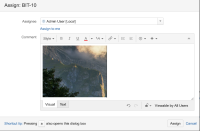
- Drag an image or paste a screenshot into the comment section ( in Visual Mode ) > Click upload


Expected Results
Image should render in the comment section.
Actual Results
The below exception is thrown in the comment section:
Unable to render embedded object: File (image-XXXX-XX-XX-XX-XX-XX-XXX.png) not found.

Notes
Pasting images or dragging an image into the comment or description directly works fine.


- is related to
-
-
- Closed
-
-
-
- Gathering Impact
-