-
Type:
Bug
-
Resolution: Duplicate
-
Priority:
 Low
Low
-
Affects Version/s: 7.3.7, 7.4.0, 7.4.3
-
Component/s: Issue - Attachments
-
None
-
7.03
-
4
-
Severity 3 - Minor
-
2
Problem.
Different methods of attaching a screenshot in JIRA results to an inconsistent MIME type.
Steps to Reproduce the issue
A. Scenario A.
- Open an issue
- Capture a screenshot and save it to the clipboard by pressing Ctrl + PrtScn keys in Windows
- Click anywhere within an issue detail page
- Press Command + V to show the Attach Screenshot screen
- Click Upload
B. Scenario B.
- Open an issue
- Capture a screenshot and save it to the clipboard by pressing Ctrl + PrtScn keys in Windows
- Click on either Description or Comment field
- Press Command + V to paste the image
Expected behaviour
The MIME Type should be the same regardless of the method you attach the screenshot.
Actual behaviour
- Scenario A
The MIME type is image/png - Scenario B
- The MIME type is text/plain
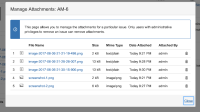

 NOTES:
- Screenshots attached in both scenarios A and B can be viewed in Chrome without any issue.
- Screenshots attached using scenario B can't be viewed in IE 11. It appears to be a broken image.
Environment
Windows
JIRA 7.3.7

- duplicates
-
-
- Closed
-
- relates to
-
-
- Closed
-
- mentioned in
-
Page Loading...