-
Type:
Bug
-
Resolution: Low Engagement
-
Priority:
 Low
Low
-
None
-
Affects Version/s: 6.4.10, 7.1.2, 7.1.8, 7.7.0, 7.13.1, 8.2.4, 8.3.0
-
Component/s: JQL
-
6.04
-
7
-
Severity 3 - Minor
-
1
Summary
Can not switch to basic issue navigator view when an upper case name is entered in a JQL query.
Steps to reproduce
- Create a new user as "NONADMIN"
- Search for the username using the following JQL query:
assignee = NONADMIN
- Can't switch back to Basic mode:
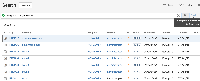

Expected Results.
You are able to switch to Basic mode.
Actual Results.
You are prevented from switching into Basic mode.
Notes
The general issue is that queries for assigne="UPPER_CASE_USER_NAME" trick the issue navigator into thinking it is a complex query. You can reproduce this issue with any username.
Workaround
You can simply type
assignee = nonadmin
and you should get equivalent results. Username searches are case-insensitive.

- is related to
-
-
- Closed
-