-
Type:
Bug
-
Resolution: Unresolved
-
Priority:
 Medium
-
Component/s: Bulk Action - Sidebar Edit Panel and Toolbar
-
None
-
6
-
Severity 3 - Minor
-
2
Issue Summary
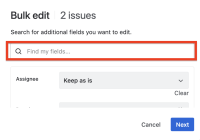
Unable to enter Japanese properly in the “Search for additional fields” field when editing multiple issues in the List view of a project.
Steps to Reproduce
- Navigate to a project and click “List”
- Check some work items and click "Edit" from the navigation bar
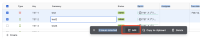
- Switch to Japanese IME and type “tesuto” into the "Search for additional fields" field


Expected Results
“てすと” will be shown
Actual Results
“tえすと” will be shown
It seems the first character is automatically entered.
画面収録 2025-06-11 14.24.41.mov
Workaround
- Copy the string "てすと" in advance and paste it into the text box


- is related to
-
-

- Closed
-
- relates to
-
-
- Closed
-