-
Type:
Suggestion
-
Resolution: Timed out
-
Component/s: Work Item - View (Internal developer use only)
-
23
-
2
Issue Summary
Make the option "Allow Site users to invite other people" unchecked by default when inviting users in issues
Steps to Reproduce
- Open any Jira issue
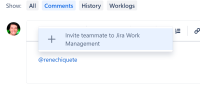
- Mention a user that is not yet part of your Jira (using "@") and you will get an option to invite a user to the product, click on the option:
- The Invite user dialog will appear, and on the lower part there is a section called "Allow" and it contains a pre-checked for "Site users to invite other people".



This is problematic as the admin needs to consciously uncheck the option every time, and if missed, it will change the User access settings for the product.
The request is to have this option always unchecked or to allow disabling it entirely, to avoid changing the User access settings accidentally.
- There is a notification indicating when a change has been made to the UIser access settings but this is still only helping fix what has already been changed, not to prevent it.


- is related to
-
- Closed