-
Type:
Bug
-
Resolution: Unresolved
-
Priority:
 Low
Low
-
Component/s: Import/Export - External System Import
-
5
-
Severity 2 - Major
-
1
Issue Summary
From Importing data from JSON document, it mentioned that we can set the status of the users when creating the new users (active: true/false).
"users": [
	{
        "name" : "abcde-12345-fedcba",
        "groups" : [ "jira-users", "my-custom-group" ],
        "active" : true,
        "email" : "user1@example.com",
        "fullname" : "User 1"
	}
]
However, the users are always get created as active users on User Management even though we set the active status to false. Example:
"users": [
	{
        "name" : "abcde-456789-fedcba",
        "active" : false,
        "email" : "user2@example.com",
        "fullname" : "User 2"
	}
]
Steps to Reproduce
- Create a JSON file with active and inactive users. Example:
"users": [
	{"name" : "abcde-12345-fedcba","groups" : [ "jira-users", "my-custom-group" ],"active" : true,"email" : "user1@example.com","fullname" : "User 1"},
 	{"name" : "abcde-456789-fedcba","active" : false,"email" : "user2@example.com","fullname" : "User 2"}
]
- Attempt the import to the site using JSON importer
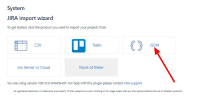
- Set the users to inactive
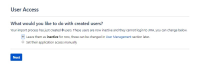


Expected Results
- User 2 is set to inactive in User Management
Actual Results
- User 2 is set to active in User Management
- User 2 received the invitation email to access the site
- If "New users have access to this product" option is enabled, User 2 is added to the default group(s) as well.
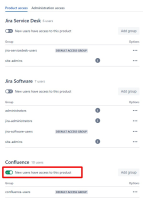

Workaround
Currently, there is no known workaround for this behavior. A workaround will be added here when available


