-
Type:
Bug
-
Resolution: Duplicate
-
Priority:
 Low
Low
-
6
-
Severity 3 - Minor
-
1
Issue Summary
While using workflows and Advanced configuration, you might want to add validators to prompt on screen when some value is not entered. Therefore using the "Field Required Validator" and ensuring that some fields are required doesn't prompt for error when doing bulk issue transition.
Environment
Jira Cloud
Steps to Reproduce
- Create a Project with some issues on it.
- Go to the workflow Project Settings > Workflow
- Edit it and add a Validator to a Transition with some fields that would be required.
- Add a Screen as well and populate it with those fields. (
 this is not necessarily essential)
 - Navigate to the issue Navigator Search, use a JQL to search out issues in a particular status e.g. "To Do"
project = AT2 AND type = Sub-task AND Status = "To Do"
- Bulk changes these results into another Status e.g. "In Progress" or "Done"

Expected Results
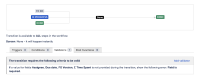
The bulk transition, should prompt and mention that, since there's a validator in place, the bulk transition will not be changed. The "Next" button should then be disabled.
Actual Results
There is no error message, even though values are entered on the fields that are required or not. The Status is not changed from "To do" to "In Progress".
Notes
There's no error on screen. an error limiting the user or prompting the user that no changes will be done and subsequently disable the button from proceeding to the next stage should be the expected outcome.
Workaround
- If you want to continue with Bulk transition, remove the validator from Transition workflow in order to proceed.
- Adding a Loop around the Status with the "Allow all statuses to transition to this one" would suffice on the Status you're attempting to transition the issues to.

- duplicates
-
-

- Closed
-