-
Type:
Bug
-
Resolution: Obsolete
-
Priority:
 Low
Low
NOTE: This bug report is for JIRA Cloud. Using JIRA Server? See the corresponding bug report.
Symptoms
Currently, it's not possible to delete or remove any field configuration in JIRA, as there isn't any delete button for it, even if the 'field config' is not used anywhere.
Steps to reproduce
- Run a vanilla JIRA 6.2.3 and install Service Desk 1.2.5
- Create a new Service Desk Project
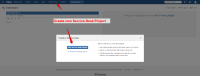
- Navigate to project Administration and disable Service Desk
- Remove Field Configuration Scheme for the newly created project. (There will be duplicated Field Configuration Scheme due to JSD-467)
- Navigate to Field Configuration. The option to delete field configuration is not available.

Workaround
You can delete a field configuration by calling the URL:
JIRA OnDemand
https://<instance-name>.atlassian.net/secure/admin/DeleteFieldLayout!default.jspa?id=111
JIRA Installed
http://<base-url>/secure/admin/DeleteFieldLayout!default.jspa?id=10201
 Where (id) is the ID of the field configuration, which you can obtain it by hovering your mouse over the field config and you will see the ID at the bottom of your browser.

- is related to
-
-
- Closed
-