Plan report page in iframe floods Jira with auth requests when accessed by unauthed user

This issue belongs to an archived project. You can view it, but you can't modify it. Learn more

XMLWordPrintable

    • Type: Bug
    • Resolution: Fixed
    • Priority: Low
    • 2.16.0
    • Affects Version/s: 2.6.1, 2.14.1
    • Component/s: Plan
    • None
    • 1
    • Severity 3 - Minor
    • 0

      How to Replicate

      1. Create a project in Jira.
      2. Create a plan in Portfolio.
      3. Navigate to Reports > Share > Embed and copy the HTML code.
      4. Paste the HTML code inside an HTML file, like in the example below:
        <!doctype html>
        <html>
        <body>
        	<iframe src='http://your-jira-instance/secure/PortfolioSharedReportView.jspa?r=PIKKY&t&e' width='1024' height='640' style='border : 1px solid #ccc;'></iframe></body>
        </html>	
        
      1. Open this HTML file using an incognito window in the browser.
      2. Open developer tools in this browser window.
      3. The content inside the iframe will be rendered as below:
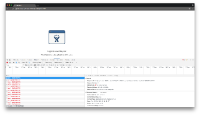
      4. Notice how there will be one HTTP request to /rest/jpo/1.0/authentication/test every second.

      Instance Details

      Reproduced on Jira 7.2.12 and Portfolio 2.6.1 and 2.14.1

        1. authentication-attempts.png
          725 kB
          Ruslan Prakapchuk

            Assignee:
            Ruslan Prakapchuk
            Reporter:
            Ruslan Prakapchuk
            Archiver:
            Aakrity Tibrewal

              Created:
              Updated:
              Resolved:
              Archived: