-
Type:
Bug
-
Resolution: Unresolved
-
Priority:
 Low
Low
-
None
-
Affects Version/s: 11.12.1
-
Component/s: Product - Settings|Setup - Announcements
-
None
-
1
-
Severity 3 - Minor
-
No
-
None
Issue Summary
The announcement banner message shows the content in an elongated way, and there is no consistency in the way the message is displayed.

Steps to Reproduce
- Create any announcement with long one-line text such as:
We encourage you to visit the following link to access detailed instructions and guidance on utilizing the new navigation features effectively:
https://<testserver>/spaces/JIRA/pages/598631529/Navigation#tab-Top+Navigation+Bar+%2F+Sidebar|https://%3Ctestserver%3E.com/spaces/JIRA/pages/598631529/Navigation#tab-Top+Navigation+Bar+%2F+Sidebar
- Verify that the preview mode shows the text correctly:
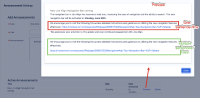

- Logout and login from Jira Align
The announcement banner is displayed - Check the way the announcement is displayed.
Expected Results
The announcement banner text displays consistently between the preview and the announcement mode. It is legible without excessive elongation or uneven spacing, especially in fully justified text.
Actual Results
The announcement banner text is not always legible as it shows excessive elongation or uneven spacing.
Workaround
Create shorter sentences and/or make sure to add URL/Links on separate lines.
With our example:
We encourage you to visit the following link to access detailed instructions and guidance on utilizing the new navigation features effectively: https://<testserver>/spaces/JIRA/pages/598631529/Navigation#tab-Top+Navigation+Bar+%2F+Sidebar|https://%3Ctestserver%3E.com/spaces/JIRA/pages/598631529/Navigation#tab-Top+Navigation+Bar+%2F+Sidebar

