-
Type:
Bug
-
Resolution: Unresolved
-
Priority:
 Low
Low
-
None
-
Affects Version/s: 11.11.1
-
Component/s: Jira Connector - Configuration
-
1
-
Severity 3 - Minor
-
No
Issue Summary
In Jira Align, when enabling the notification to alert when the API connection fails in Jira Settings, deactivated Super Admins are receiving notification emails from Jira Align regarding the failed Jira connection.
Steps to Reproduce
- Navigate to Settings > Jira Settings.
- Locate the option Alert When Jira API connection fails and set it to "Yes".
- Deactivate a Jira Align Super Admin account:
- Ensure the account is deactivated.
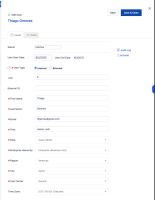
- Ensure the account is deactivated.
- Wait for a Jira API connection failure to occur.
- Go to Settings > Logs > Mail.
- Find the email with the subject line "Jira Connection failed [ID1] for site https://jiraalign-url".
- Click on the email body and check the Mailed to field.
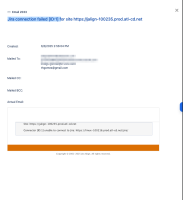
Expected Results


Deactivated Super Admins should not receive the notification email when the Jira API connection fails.
Actual Results
Deactivated Super Admins are still receiving the notification email when the Jira API connection fails.
Workaround
Add admins explicitly in Jira Align administration → Jira Settings → Jira Setup tab → Send alerts if Jira Align cannot connect to API. This will ensure only the specified email addresses get the notification.


- is connected to
-
JAIAC-6891 Loading...
- relates to
-