-
Type:
Bug
-
Resolution: Unresolved
-
Priority:
 Low
Low
-
None
-
Affects Version/s: 11.12.0
-
Component/s: Enterprise Insights - Product
-
1
-
Severity 3 - Minor
-
No
Issue Summary
The Platform Terminology changes made to "Features" on Jira Align UI is not updated at EI "[current_dw].[Agile Object]" table.
The development team investigated and found that in Jira Align, selecting "System Defaults" from the platform terminology dropdown does not propagate updates to EI and AA. In contrast, choosing any other terminology option and saving the changes will update and reflect in EI and AA.
Steps to Reproduce
- Step 1. Go to Administration >> Settings >> Platform Terminology
- Step 2. Go to Platform Terminology Setup and select System Defaults
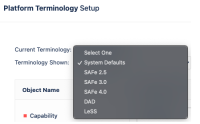
- Step 3. Change the Features name for both "Object Singular" and "Object Plural" from "Feature" to "New Feature"
- Step 4. Click on "Update Terminology"
- Step 5. Check the EI "[current_dw].[Agile Object]" table

Expected Results
when "System Defaults" is selected, Changes made to "Features" in the Platform Terminology on the Jira Align UI should successfully update the "[current_dw].[Agile Object]" table in EI and AA.
Actual Results
Changes made to "Features" in the Platform Terminology on the Jira Align UI do not update the "[current_dw].[Agile Object]" table in EI when "System Defaults" is selected. However, selecting any other terminology option and saving the changes does update and reflect in EI and AA.
Workaround
Currently there is no known workaround for this behavior. A workaround will be added here when available


- is connected to
-
JARDA-6675 Loading...
- relates to
-