-
Type:
Bug
-
Resolution: Unresolved
-
Priority:
 Low
Low
-
None
-
Affects Version/s: 11.8.1
-
Component/s: Dynamic Reports - Team Room
-
1
-
Severity 3 - Minor
-
No
Issue Summary
In the current version of Jira Align, reactivating an inactive Agile Team does not allow it to be accessed from another active team's Team Room.
Steps to Reproduce
- Navigate to the "Teams" section in Jira Align and select "View All Teams." Search for the specific Agile Team you are interested in.
- Click on the desired team and change the "Active" dropdown setting from "Yes" to "No" to deactivate the team.
- Wait approximately one hour or more after deactivating the Agile Team
- Return to the same Agile Team that you deactivated and change the "Active" dropdown setting back from "No" to "Yes" to reactivate the team
- In Jira Align, click on "Teams" and select a team that was not deactivated.
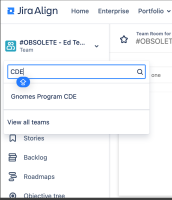
- In the selected Team Room, use the team name filter to find and select the Agile Team that you recently reactivated.


Expected Results
The reactivated Agile Team should be accessible from the Team Room of another active team.
Actual Results
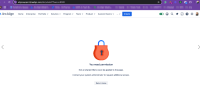
The reactivated Agile Team is not accessible from another Team's Room, even after reactivation.
Furthermore, The message "You need permission - Not all shared filters could be applied to the page. Contact your system" is causing confusion among users.
Workaround
Currently, there is no known workaround for this behavior. A workaround will be added here when available


- is related to
-
-
- Short Term Backlog
-
- is connected to
-
JAWM-8334 Loading...
- relates to
-