-
Type:
Bug
-
Resolution: Fixed
-
Priority:
 Medium
-
Affects Version/s: 11.5.1
-
Component/s: Dynamic Reports - Backlog
-
1
-
Severity 3 - Minor
-
No
Issue Summary
Capability Unassigned Backlog is not displaying in Kanban > State View
Steps to Reproduce
- From Portfolio menu, select a Portfolio that contains a mix of Capabilities (some assigned to PIs, some not assigned to any PIs)
- Select Backlog and choose 'Capability Backlog' from the drop-down
- From the the PI drop-down, select a PI that has some Capabilities assigned to it
- Expand the 'Unassigned Backlog' section and observe the expected Capabilities which don't have a PI assigned:
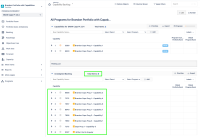
- Switch to Kanban -> State View
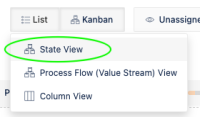
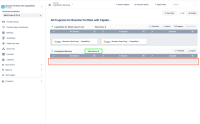
- Expand the 'Unassigned Backlog' section again and observe that although Total Items count is correct, no Capabilities are displayed:


Expected Results
Capability Unassigned backlog in Kanban > State View should display expected Capabilities
Actual Results
Capability Unassigned backlog in Kanban > State View fails to display expected Capabilities
Workaround
Currently there is no known workaround for this behavior. A workaround will be added here when available


