-
Type:
Bug
-
Resolution: Unresolved
-
Priority:
 Low
Low
-
None
-
Affects Version/s: 10.133.2
-
Component/s: Features - Action
-
1
-
Severity 3 - Minor
-
No
Issue Summary
The Native Date Labels field terminology is still used in the Feature error message when the dates of the parent capability don't match.
Steps to Reproduce
Pre-requisite:
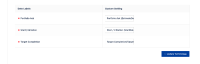
- Change the Date labels under the Jira Align Administration > SETTINGS > Platform Terminology Setup:
For example, the Portfolio Ask with Portfolio Ask (EstimateDate)
- Use a Portfolio with Capability enabled

- Create an Epic: 'Epic1'
- Add to 'Epci1' a child capability: 'ChildCapability1'
- Add to 'ChildCapability1' a child Feature: 'ChildFeature1'
- Open the slideout panel of the 'ChildCapability1' and set Set a date for the field Portfolio Ask (EstimateDate) (for example: 1st June 2024 (6/1/2024)
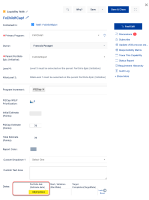
- Save the change
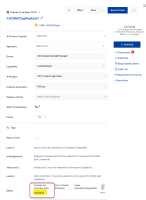
- Open the slideout panel of the 'ChildFeature1' and set Set a date for the field Portfolio Ask (EstimateDate) (for example: 1nd June 2024 (6/2/2024)


Expected Results
The customized label is used in the error message:
Portfolio Ask (EstimateDate) date equal or prior to 6/1/2024
Actual Results
The default/native label is used instead of the customized one in the error message:
Pick Portfolio Ask date equal or prior to 6/1/2024


Workaround
Currently, there is no known workaround for this behavior. A workaround will be added here when available


- is connected to
-
JAWM-7006 Loading...